Order data
Order data is extra details that follow the order and are printed on the delivery, for example receiver or carrier.
Before you start
- The order exists, see Orders.
- The function is switched on at your company. Otherwise Order data is not shown in the app.
Add order data
- Open the order. Under Lägg till order data (Add order data) there is the Fördefinierad (Predefined) switch and one or more fields.
- With Fördefinierad switched on you choose values from lists your company has set up, for example Mottagare (Receiver) and Transportör (Carrier).
- Tap Lägg till (Add).
Expected: The detail shows in the Order data card, and the counter on the card goes up. Tap the card to see all details.
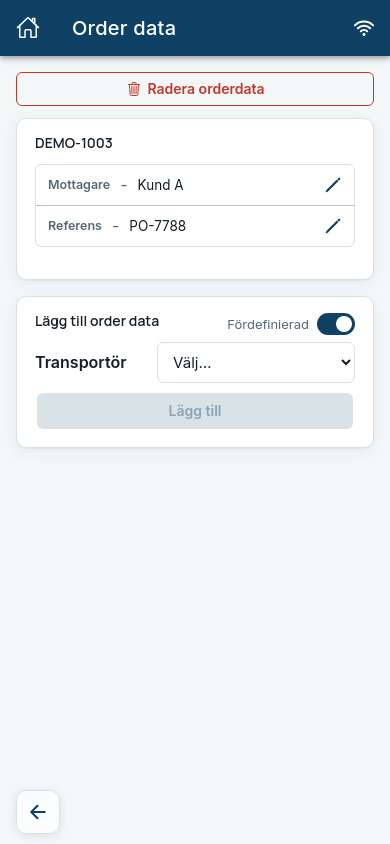
If you switch off Fördefinierad you can instead type any key and value, for example Ref and PO-1234, if your company allows it.
Receiver controls the delivery list
Orders with different Mottagare cannot be on the same delivery list, see Deliveries.
Change order data after printing
If you change order data after the pallet labels have been printed, Order datan har ändrats (The order data has changed) is shown. Choose which pallets to print again with Välj pallar att skriva ut (Choose pallets to print). They are then printed with the new order data.
Common errors
| Message | What to do |
|---|---|
| Inga attribut. (No attributes.) | The order has no order data yet. Add it as described above. |
| You do not see Order data in the app | The function is switched off at your company. Ask your TenantAdmin to switch it on. |